Title: BioLinks
Author: Jérémie samson
Published: 21 Aprily 2026
Last modified: 07 May 2026
---
Search plugins

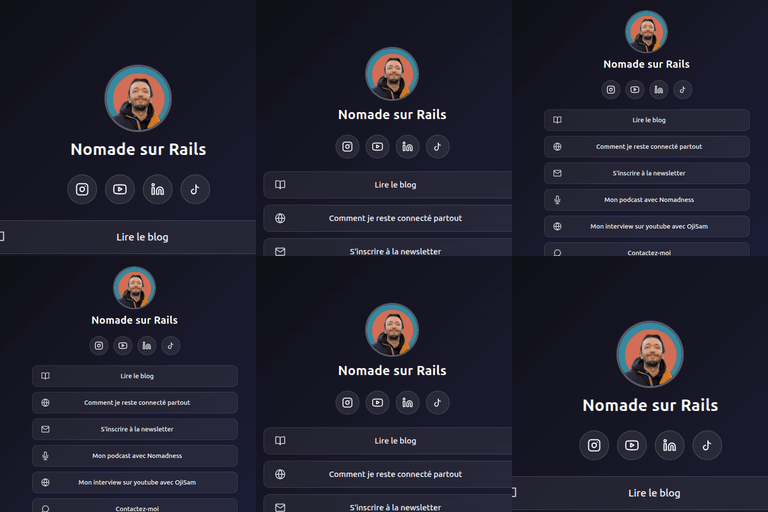
# BioLinks
By [Jérémie samson](https://profiles.wordpress.org/nomadesurrails/)
[Download](https://downloads.wordpress.org/plugin/biolinks.1.1.5.zip)
* [Details](https://mg.wordpress.org/plugins/biolinks/#description)
* [Reviews](https://mg.wordpress.org/plugins/biolinks/#reviews)
* [Installation](https://mg.wordpress.org/plugins/biolinks/#installation)
* [Development](https://mg.wordpress.org/plugins/biolinks/#developers)
[Support](https://wordpress.org/support/plugin/biolinks/)
## Description
BioLinks lets you create a beautiful, self-hosted link in bio page on your own WordPress
site.
No third-party accounts. No subscriptions. No limits. Just a free, open-source plugin
that gets the job done.
**Features:**
* **5 visual templates**: Dark, Light, Minimal, Colorful, Glassmorphism
* **Custom accent color**: Native WordPress color picker to match your brand
* **Social media icons**: Instagram, YouTube, TikTok, LinkedIn, Twitter/X, Facebook,
GitHub, Pinterest, Twitch, Snapchat (SVG icons displayed automatically)
* **Click tracking**: Built-in analytics with daily charts and per-link stats inside
your WordPress admin
* **Standalone page**: No theme header/footer, works with any WordPress theme
* **Zero external dependencies**: Everything hosted on your server. No CDN, no
cookies, no third-party tracking. GDPR friendly by design
* **Drag & drop link ordering**: Reorder your links with a simple drag and drop
* **Media Library integration**: Upload your profile photo directly from the WordPress
media library
**Why BioLinks instead of Linktree?**
Linktree hosts your page on their domain (linktr.ee). With BioLinks, your page lives
on your own WordPress site. You keep full control over design, data, and SEO.
## Screenshots
* [[
* Profile configuration: Set your photo, display name, bio, and page slug.
* [[
* Social networks: Enter URLs for your social accounts. Only filled networks are
displayed.
* [[
* Add a link: Add links with a name, URL, optional icon, and position.
* [[
* Manage your links: View all links with click stats. Reorder with drag & drop.
* [[
* Appearance settings: Choose from 5 templates and pick a custom accent color.
* [[
* Statistics dashboard: Daily click charts and per-link breakdown.
* [[
* WordPress dashboard widget: At-a-glance click stats with KPIs, 30-day sparkline,
and top 3 most clicked links.
## Installation
1. Upload the `biolinks` folder to the `/wp-content/plugins/` directory, or install
the plugin through the WordPress plugins screen directly.
2. Activate the plugin through the ‘Plugins’ screen in WordPress.
3. Your page is created automatically at `/links/`.
4. Go to **BioLinks** in the admin menu to configure your links, photo, and template.
## FAQ
### Is BioLinks really free?
Yes, 100%. No premium version, no locked features. The full plugin, forever.
### What’s the difference with Linktree?
Linktree hosts your page on their domain (linktr.ee). With BioLinks, your page lives
on your own WordPress site. You keep full control over design, data, and SEO.
### Is it compatible with my WordPress theme?
BioLinks generates a standalone page without your theme’s header or footer. It works
with any WordPress theme.
### Can I customize the design?
Choose from 5 templates and customize the accent color. For advanced customization,
you can add custom CSS in the WordPress customizer.
### What happens when I uninstall the plugin?
All BioLinks data (links, settings, statistics) and the generated page are permanently
deleted. Make sure to export any data you need before uninstalling.
### Does it work with caching plugins?
Yes. The bio page is a standard WordPress page and works with all major caching
plugins (WP Super Cache, W3 Total Cache, LiteSpeed Cache, etc.).
## Reviews
There are no reviews for this plugin.
## Contributors & Developers
“BioLinks” is open source software. The following people have contributed to this
plugin.
Contributors
* [ Jérémie samson ](https://profiles.wordpress.org/nomadesurrails/)
[Translate “BioLinks” into your language.](https://translate.wordpress.org/projects/wp-plugins/biolinks)
### Interested in development?
[Browse the code](https://plugins.trac.wordpress.org/browser/biolinks/), check out
the [SVN repository](https://plugins.svn.wordpress.org/biolinks/), or subscribe
to the [development log](https://plugins.trac.wordpress.org/log/biolinks/) by [RSS](https://plugins.trac.wordpress.org/log/biolinks/?limit=100&mode=stop_on_copy&format=rss).
## Changelog
#### 1.1.5
* Fixed an initialization race condition that prevented the dashboard widget sparkline
from rendering when Chart.js was loaded in the footer
#### 1.1.4
* Added a WordPress dashboard widget showing BioLinks click stats (today, 7 days,
30 days, all-time KPIs, 30-day sparkline, and top 3 most clicked links)
#### 1.1.3
* Renamed transient key to use the `biolinks_` prefix (was `bl_`), avoiding potential
conflicts with other plugins
* Replaced promotional wording on the optional footer credit admin setting with
neutral, factual labels (opt-in behavior unchanged, remains disabled by default)
#### 1.1.2
* Replaced inline `